
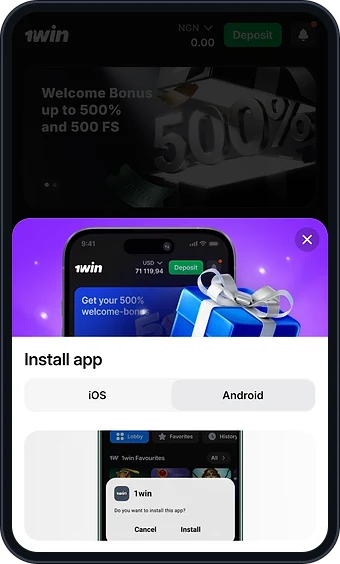
Where the route starts on the handset
Test passport
- Checked
- 14 Oct 2026 (iPhone, Nigerian IP), after checks on 8 and 13 Oct
- Device
- Phones only: Android Chrome (8 and 13 Oct), iPhone Safari (13 and 14 Oct)
- What we did
- Read "1win for Android" and "1win for iOS" in the menu and the "Install app" window on 14 Oct; did not install
- What we did not do
- No app installed; no deposit, withdrawal, document upload or bet made
Your first tap is Menu, on the bar at the bottom of the screen. The install entry sits high in the list and takes its name from your system: “1win for Android” or “1win for iOS”. A single line runs beneath it, “200 Points bonus for installing the app”.
Two of our checks reached this entry. On 13.10 a browser posed as an Android phone and then as an iPhone, signed out, and each label showed up as expected. On 14.10 a tester holding a real iPhone on a Nigerian connection opened it while signed in. Either way the tap leads to a window called “Install app” with one tab per system, so you can read the other platform’s steps as well as your own.
The two tabs of the Install app window
The table keeps each tab’s order. Quotes are the site’s words; one Android step is rephrased, because its original wording uses a term this guide does not print.
Android
- FirstPoint the camera at the code (“Scan the QR code”)
- SecondThe site passes the app to the handset
- Third“Install it”
- FourthNothing more
- FifthNothing more
iPhone
- FirstSame code, same camera
- Second“Copy the link and open it in Safari on your smartphone”
- ThirdPress Share at the bottom of Safari
- FourthPick “Add to Home Screen”
- FifthConfirm with “Add”
Android: what each step means on the phone
The code exists for people reading the operator’s page on a laptop: the camera picks it up and the link jumps to the handset. Already on the phone? The same tab offers the app directly. “Install it” closes the list, and the tab says nothing about the screens you will meet during setup.
This is where our team stopped. With no Android installation done, we cannot tell you what the first screen looks like, how sign-in works inside it or which permissions it requests. Reach the operator by typing its address into the browser yourself and take the app only from that Menu entry; a link dropped into a WhatsApp or Telegram group is not a source.
iPhone: the Safari path
The 1win app for iOS is a web app saved to the home screen, so expect no App Store page. The tab picks Safari on purpose, since other browsers on an iPhone may not show the “Add to Home Screen” choice in their share menu.
Under the hood, the operator publishes a manifest declaring the name “1win”, a start address of “/” and a “standalone” display. That last setting is why the saved icon shows the site in a frame of its own, free of the Safari toolbar, while it still runs the live site rather than a copy.
From the icon to the first stake
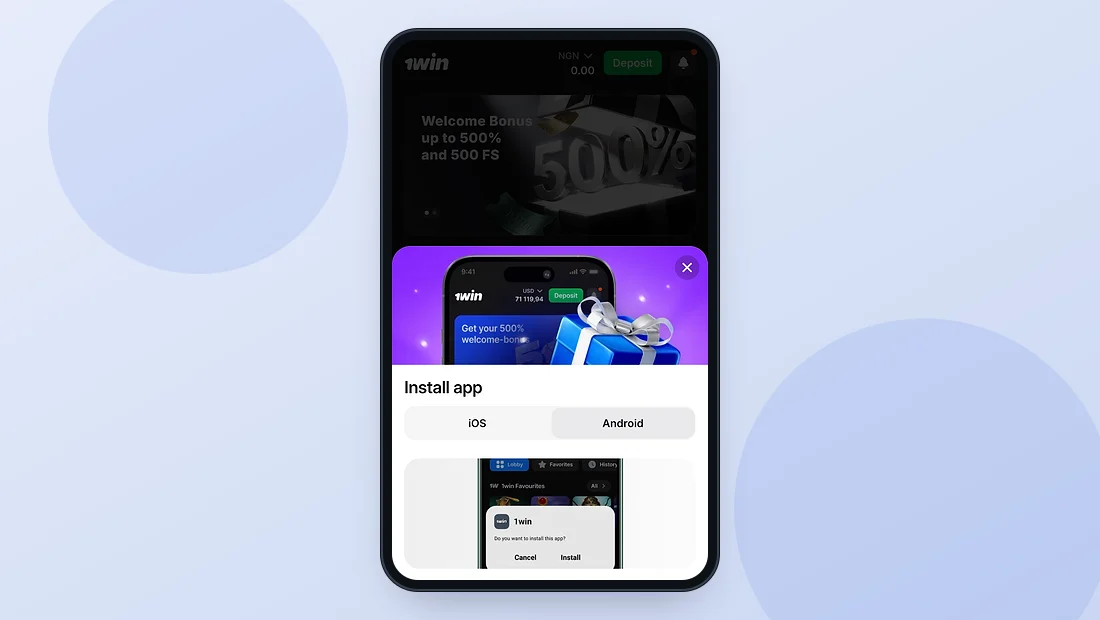
After the icon appears, everything else matches the phone browser. Here is the whole route, stage by stage, with the first two recapped from above and what our checks recorded at each.
- Find “1win for Android” or “1win for iOS” in Menu.
- Follow the “Install app” window; in the phone browser the dark theme shows Menu, Home, Casino, Free money and Sports along the bottom. We installed nothing.
- Create an account with a +234 number and a password of at least eight characters, or use the Phone or Email tab to sign back in.
- Visit the cashier: on 14.10 it showed nine naira methods, each with a range of its own.
- Choose a price in Sports: it drops into a slip with Single, Multiple and Series tabs, signed in or not. Read the slip, then press “Place a bet”, the one button we never pressed.
- Know the way to help before you need it: Menu, Support 24/7, Online chat.
We covered these stages in phone browsers, not inside an installed app. For the sign-in stage, our page on what the Phone and Email tabs ask for goes field by field.
The 200 Points line
That line under the Menu entry is the app’s only reward, worded the same on Android and iPhone. The bonus cards never mention it, and the window gives no conditions. Without an installation of our own, we have no way to tell you the timing, the value or the place where Points show up.
Count it as a statement by the operator and nothing more. The four-deposit welcome package is a different offer, and the install window does not connect them.
What the window leaves unsaid
Before you put anything on a phone, four facts help: the oldest supported system, the storage it needs, the permissions it requests and how new versions reach you. The window covers none of the four.
| Item | What 1win.ng showed | Status |
|---|---|---|
| Menu entry per system | Label follows Android or iOS | Seen on site |
| Install steps | Three for Android, five for iPhone | Seen on site |
| Reward for installing | 200 Points, no conditions | Stated by site |
| Manifest display mode | “standalone” | Seen on site |
| Oldest supported system | Missing | Seen on site |
| Storage and permissions | Missing | Seen on site |
| How the installed app runs | We installed nothing | Not checked |
A 1win app update on each system
No update schedule is published. On the iPhone this barely matters, because the saved icon always opens the current site. On Android, nothing in the window says how a newer build would arrive. Should the app start acting up, return to the Menu entry on the operator’s site and run through the tab once more.
Speed on a weak signal
An icon does not shrink a page. Testing an iPhone over a VPN on 14.10, our tester waited 5.2 seconds for the home page’s main content the first time and 3.2 seconds when coming back. The saved web app fetches that very page, so a poor network will feel the same either way.
Betting and casino inside the icon
In practice, the 1win betting app means the Sports button, with sections for Top, Live, Upcoming, TOP Bets, Esports and Bet history and decimal prices throughout. To see every tap from price to confirmation, use our walkthrough of a first Single, Multiple or Series on the phone slip.
Likewise, the 1win casino app means the Casino button. Search, a Providers list and chips like Bonus buy and Live casino do the sorting, and the 13.10 catalogue gave most slots and quick games a demo mark. Readers hunting for a 1win game app for crash titles can search for Aviator, JetX or Lucky Jet. Our notes on sorting the lobby by studio explain the tools.
Pros
- The operator spells out both routes in its own menu
- An iPhone needs Safari and nothing else
- The saved icon opens in a frame of its own
- Account, cashier and slip match the mobile site exactly
Cons
- Oldest supported Android or iOS version not stated
- Storage and permissions for Android not listed
- iPhone owners hoping for a store page will not find one
- The Points reward has no published conditions
Verdict on the 1win app route

7.2/10
Our score · 1win.ng checked on a phone 8, 13 & 14 Oct 2026 · how we score
About 1win app access in a sentence: the entry is where a thumb expects it, each tab fits on a single screen, and on the iPhone Safari alone does the job. Marks are lost because the window skips the facts a cautious owner wants before installing. Our scoring rules behind App & install show how the area was weighed.
It suits iPhone owners content with a saved web app, and Android owners who want an icon for the same site, taken from its own Menu.
Who should skip it: people who only install from a store, and owners of old or crowded phones who must know version and storage first.
Get the Android app from 1win.ng18+ · T&C Apply · operator named in the 1win.ng footer: BID Entertainment Limited
What changed on this page
- Page written for 1wins-apk.ng from our checks of 1win.ng on 8, 13 and 14 October; every 1win figure is marked by source.
Found a mistake? Write to [email protected] and we will date the fix here.
FAQ
Does the iPhone version come from the App Store?
No. Safari saves a web app to the home screen through Share, Add to Home Screen and Add.
Where is the Android version offered?
In Menu, under "1win for Android". Its tab has three steps: scan the code, let the site pass the app to the phone, install it.
When are the 200 Points paid?
The site does not say. The line promises 200 Points for installing, and since we installed nothing, we cannot confirm timing or value.
Will the app run on an older Android phone?
We cannot tell you, because the window states no minimum version and no storage size.
Is installing required to bet from a phone?
No. The phone browser gives the same bar, account, cashier, Sports and Casino.
How does the saved iPhone icon get new features?
Automatically, since each launch loads the operator's current site.
Learn more about 1win Withdrawal in our dedicated guide.